

For iPad and iPhone
Film every game
like a pro.
One iPad or iPhone becomes a broadcast booth: a real scoreboard burned into the picture, instant replays, extra cameras, and your own clips — intros, player highlights, sponsor spots — rolled in live. Yeah, I know. This is awesome.

Do it all on the iPad — or run up to 4 devices — 3 cameras and 1 remote
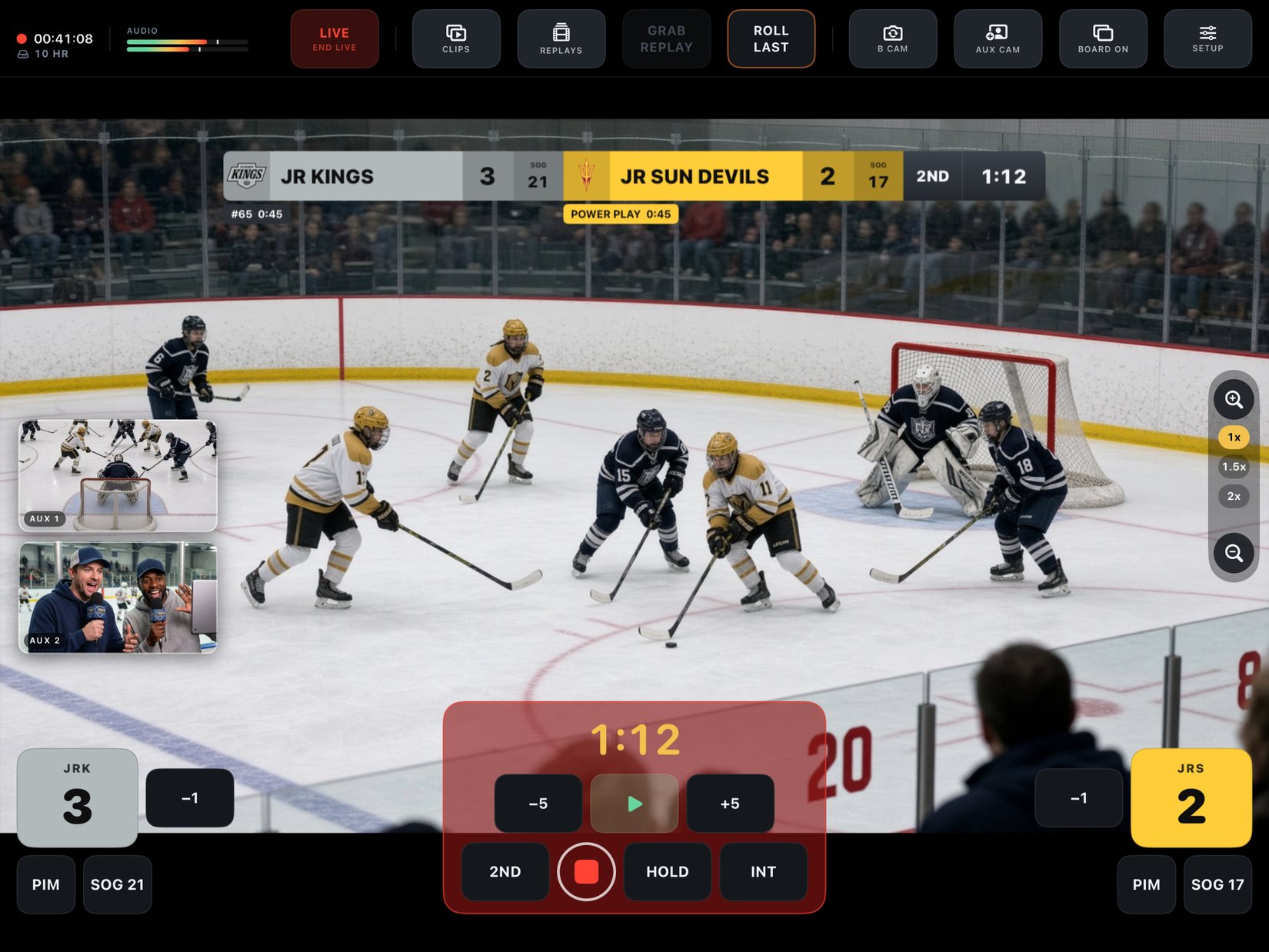
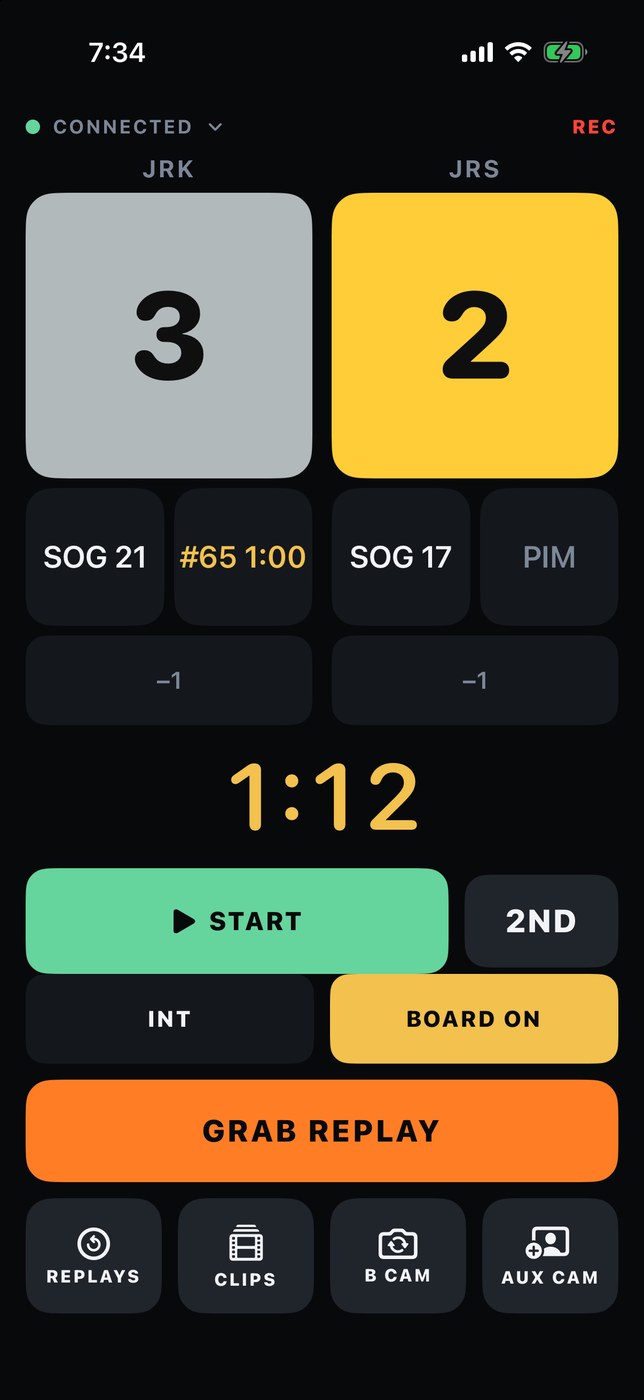
One person can run it. More devices, more show. Up to four devices, one broadcast: this one films, a phone runs the scoreboard while you stay on the play, and two more become AUX 1 and AUX 2 — you cut between angles live. Pair a device once and it finds the game on its own after that, and any phone can switch between camera and remote. No iPad? An iPhone runs the whole booth on its own.
From the App Store
Reviews straight from the stands.
Great way to rewatch games!
Love this app for my son’s hockey games. The multiple angles and detail makes it great for rewatching and coaching through good/bad moments!
I feel like a Pro!!
As a grandparent watching games, I love being able to get this video. I can share it with whoever I want and the grandkids love going back to watch it over & over. Replay is super nice!
Epic!
This is just what we needed for our men’s Basketball league. We’ve been playing for years and never had anything to show for it. … the scoreboard feature is a huge bonus that just makes everything so official.
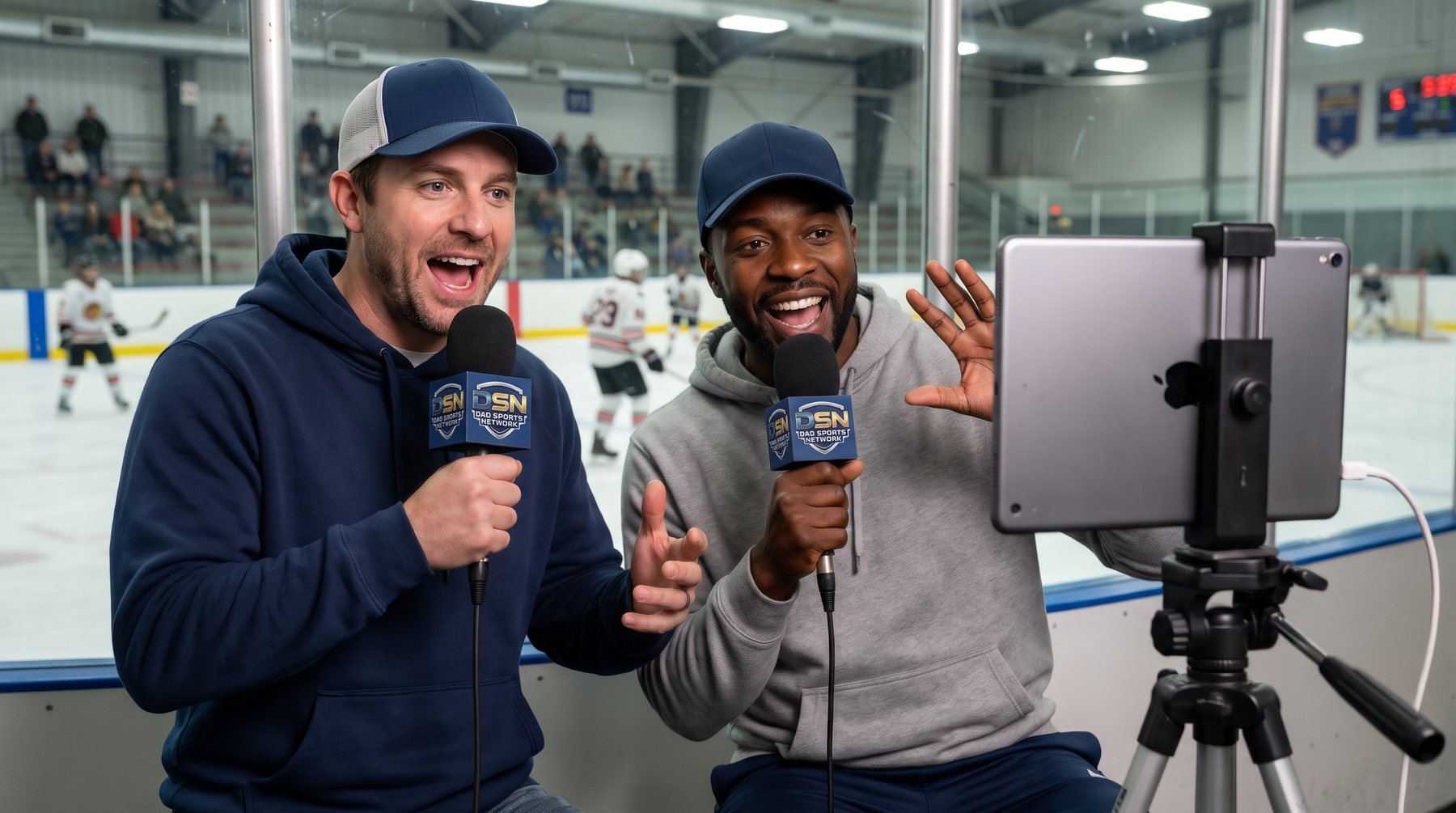
Call the game like it’s on TV.
Live to YouTube or Facebook at 1080p — scoreboard, replays, commentary and all.
See it
Choose your sport, create your teams, customize your board…then press record.
Pick your sport, load your team's names, colors and logos, and pick one of five board designs. Replays and clips at the touch of a button. Every frame below came straight out of the app with the scoreboard already burned into the picture.
Across the top
Clips and Replays open their bins. Grab Replay takes the last ten seconds, and any replay in the bin can go straight to a group text, with sound. Go Live starts the stream, Board hides the scoreboard for a moment, Setup is everything else. The recording timer and the live mic meters sit to the left, so you can see the audio is really arriving.
Down the sides
Score for each team, big enough to hit without looking. Under them, whatever that sport actually tracks — shots, penalties and the power play for hockey, ringette and lacrosse, the sin bin for rugby, downs and timeouts for football, timeouts for basketball, the bases, the count and the pitch count for baseball, the serve for volleyball and tennis, side outs and servers for pickleball, and runs, wickets and overs for cricket.
Along the bottom
The clock, with −5 and +5 for when you were late on the whistle, the period button, and record. Nothing is more than one tap away, because a menu during a game is a goal you missed.
The clip bin
Intros. Players. Sponsor spots.
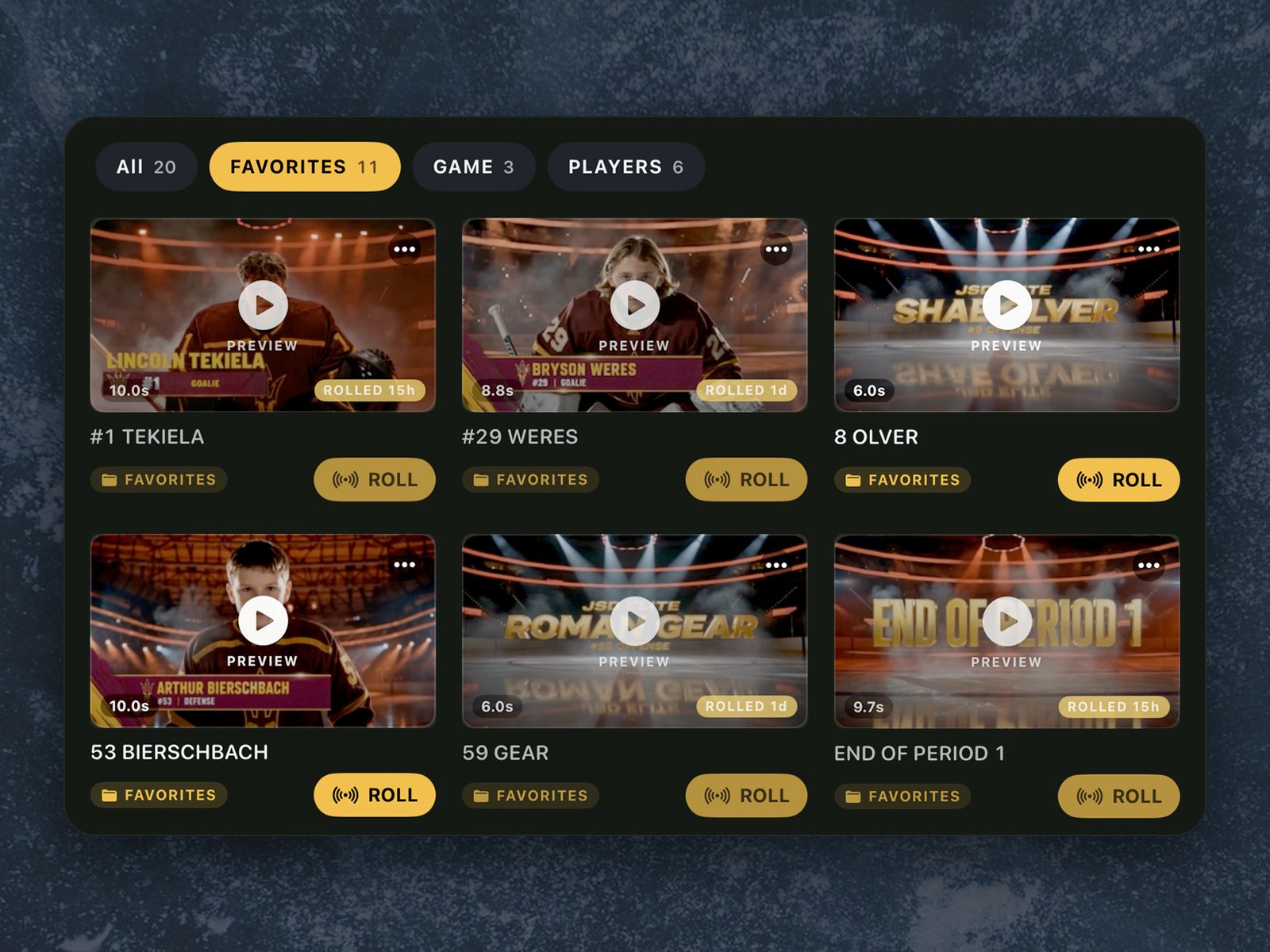
Load your own video before the game — a player card for every kid, a season intro, the sponsor's spot — and roll it live in one tap. The scoreboard steps aside while it plays and comes back when it's done.
File clips into groups you name yourself — Players Game Favorites — and they stay on the iPad all season. A grid when you find things by looking, a list when you find them by name.
The team page
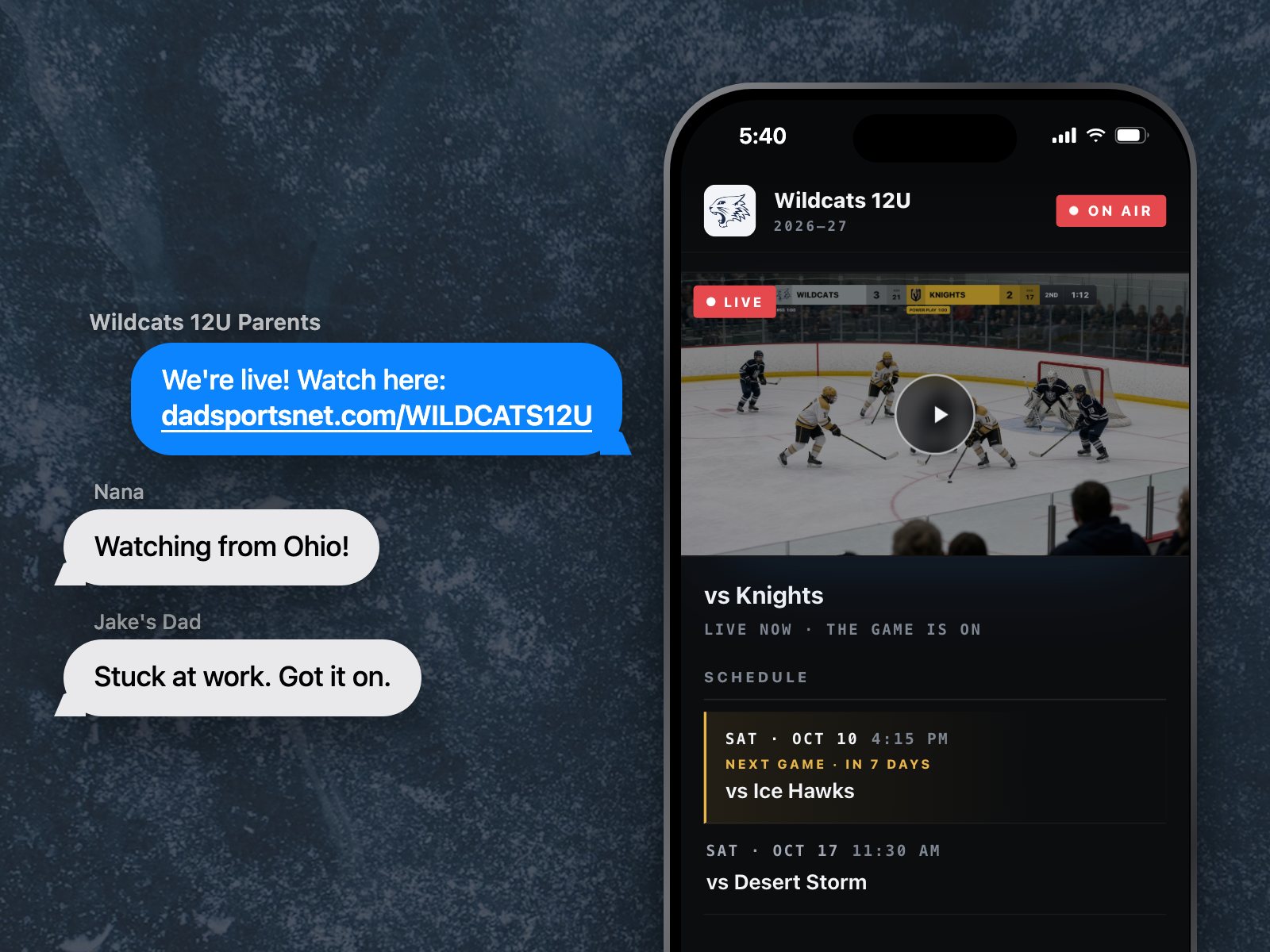
Dedicated team page for live streaming.
Give your team its own watch page, like dadsportsnet.com/WILDCATS12U. Families tap one link to watch live and catch up on past games — no app or account needed.
It runs itself. Go live on YouTube and the page goes on air. Add your next game and it shows up there too. Set it up once in Setup → Your teams → Team Page. Part of Pro.
More than one team? Keep all your teams in Setup, each with its own logo, colors, roster, stream and team page. Your first team page comes with DSN Pro. Each extra team page is $2.99 a month.
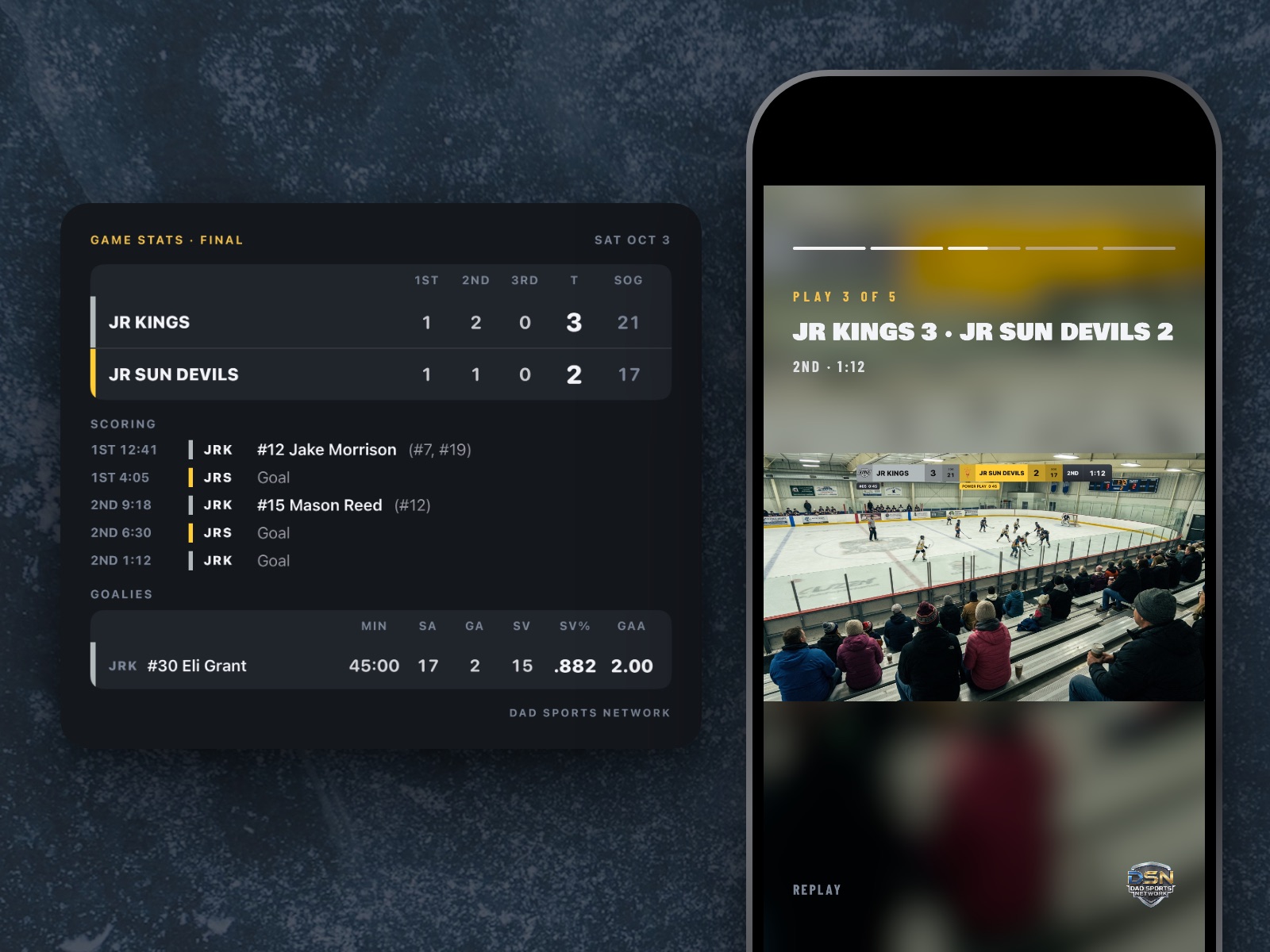
Game stats
Game stats for every goal.
After each goal, tap who scored and who assisted. At the final horn you get the game stats. Share them as a picture. Hockey, ringette and lacrosse goalies get saves, SV% and GAA.
Roll the game stats onto the broadcast while the teams shake hands. Then pick your plays and get a highlight video with the final score. Save it or share it.
For hockey, soccer, lacrosse and ringette.
How it stacks up
The most features, for the least money.
Priced against the other apps that put a scoreboard on youth sports video. Same job, on the iPad or iPhone you already own, for a quarter of what the closest one charges to unlock everything.
| Dad Sports Network | ScoreCam | GameChanger | sidelineHD | |
|---|---|---|---|---|
| Per year, everything unlocked | $24.99 | $99.99 | $99.99 | $35.99 |
| Scoreboard burned into the video | Yes — five designs | Yes | Yes — one overlay | Yes |
| Your names, colors and crest | Included | Top tier only | — | Yes |
| Instant replay while you film | Yes | Yes | — | — |
| Game stats — scorers, assists, goalies | Yes | — | Yes | Yes |
| Game stats rolled onto the video | Yes | — | — | — |
| Highlight video to share | Yes | Yes | Yes | Yes |
| A team page: live, next game, past games | Yes — no app or account to watch | — | — | — |
| Extra camera angles, cut live | Yes — up to 3 cameras | — | — | — |
| Roll your own clips mid‑game | Yes — intros, player cards, sponsors | — | — | — |
| A clean second file, no graphics | Yes | — | — | — |
| Phone as a scoreboard remote | Yes | Yes | — | — |
| Account required | No | — | Yes | Yes |
Competitor pricing and features checked October 2026 from each company’s own published material and App Store listings. Each figure is the cost to unlock everything that company offers for a year (ours covers one team page; each extra team page is $2.99 a month): ScoreCam’s Branding + Live Stream tier, GameChanger’s Premium tier, sidelineHD’s sidelinePRO. All three have a free or cheaper tier that does less. Blank cells mean we could not confirm the feature either way, not that it is missing. If any of this goes out of date, tell us and we will fix it.
What it costs
Free to film. Pro to make it yours.
- One sport — the one you pick on first launch
- HOME and AWAY, stock colors
- Classic Broadcast board
- Records your game, with the DSN mark
- All sports
- Your team names, colors and logos
- Five board designs
- Up to 4 devices — 3 cameras and 1 remote
- Instant replays to share, and your own clips
- Instant highlight recap for sharing
- Live streaming to YouTube or Facebook
- A dedicated team page for live streaming
- Save teams to your library
- A clean second file with no graphics
- Remove or replace the DSN mark
$4.99 a month if you would rather. Each extra team page is $2.99 a month. Cancel any time; nothing you have recorded is ever deleted, and the board goes back to Classic Broadcast.

Free on the App Store. Pro is a 7-day trial, then $24.99 a year — cancel any time.
For clubs
One code for your club.
Six months of Pro for every family.
We give youth hockey clubs a single code that unlocks Pro — every sport, every board, extra cameras, replays, live streaming — for six months, for every parent in the program. A whole season of games filmed like they're on TV, and nobody on the board has to buy a camera.
- Your club gets a code. One word, like . It works for anyone in the program.
- Parents open the link. The App Store shows the offer — six months of Pro, no charge today.
- Pro is on for the season. After six months it's $4.99 a month, and anyone can cancel any time. Nothing recorded is ever deleted.
On purpose
What it doesn't do.
A camera app that films children has no business collecting anything. So it doesn't. Everything below is a design decision, not a feature we haven't gotten to.
- account to create, and no password to forget
- cloud upload — your video never leaves your device on its own
- analytics, trackers or advertising SDKs
- access to your photo library — the app can only add to it
- data sold, shared or handed to anybody
Why this exists
Built by a hockey dad, for hockey dads…
…(and all sports parents).

When my son's hockey team put me in charge of the YouTube page, I had no idea what I was doing. As I researched all the options for filming, I realized every app either was glitchy or way too expensive or both. So I decided to build something I would actually use.
How could I make it super easy for my family back in Chicago to watch a high quality broadcast of my son's games without spending a fortune? What features would I want to see if I was watching?
That's why I built DSN. And that's why it's the best sports broadcast app on the market.
Kyle — founder · Scottsdale, Arizona
- Hockey
- Basketball
- Soccer
- Football
- Lacrosse
- Baseball
- Volleyball
- Tennis
- Pickleball
- Rugby
- Cricket
- Ringette
On the iPad or iPhone you already own. Free to film, and Pro is seven days free before it costs anything.